




























If you have ever spent hours watching Formula Drift clips or reading about 90s JDM culture, you know that drifting is more than just racing—it is a form of expression. FR Legends captures this spirit better than almost any other title on the market. While it started as a mobile sensation, bringing this experience to your Windows PC unlocks a new level of precision and immersion that touchscreens simply cannot match.
The Spirit of Drifting
FR Legends stands for “Front-Engine, Rear-Wheel Drive,” the classic drivetrain configuration for drift cars. Unlike standard arcade racers where you simply brake to slide, this game demands that you understand the physics of weight transfer. You don’t just steer; you feather the throttle, manage your handbrake, and counter-steer to maintain the perfect angle.
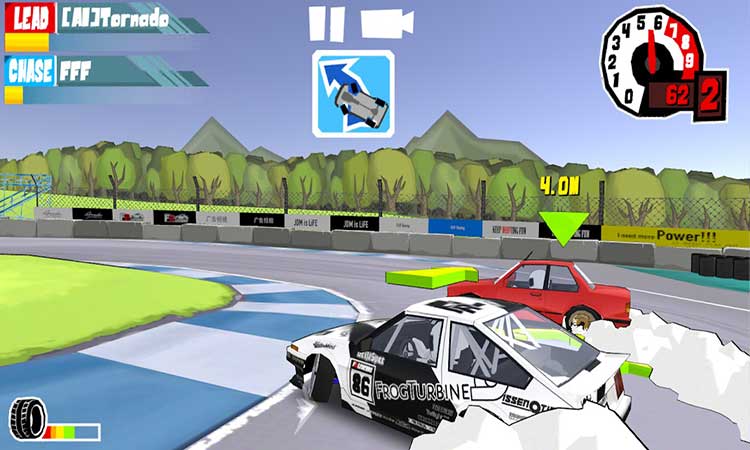
The game is unique because it judges you based on real-world competition rules. Speed is important, but it is secondary to your line and angle. You are scored on how close you can get to “clipping points” (specific zones on the track) and how aggressively you can throw the car sideways without spinning out. On a PC monitor, reading these lines becomes significantly easier, allowing you to perfect runs that would be frustratingly difficult on a smaller phone screen.
A Garage Like No Other
The heart of FR Legends lies in its garage. This isn’t just a menu where you swap colors; it is a comprehensive mechanic simulator. You build your drift missile from the ground up.
The customization is staggeringly deep. You can swap engines, upgrading from a modest stock motor to a screaming rotary or a turbocharged inline-six. Every part of the car is modular. You can remove body panels for that “missile” look, zip-tie your bumpers after a crash, and fine-tune your suspension geometry. Adjusting your camber, caster, and tire pressure genuinely affects how the car handles on the track.
On PC, this customization shines. The cel-shaded graphics- reminiscent of initial D and classic manga—look crisp and vibrant on a high-resolution display. You can zoom in to see the details of your interior, from the custom steering wheel to the roll cage, without your fingers blocking the view.
Mastering the Tandem
The ultimate test in FR Legends is the tandem battle. This mode pits you against an AI or human opponent in a two-run format. First, you lead, trying to set the perfect qualifying run. Then, you chase, attempting to mimic the leader’s line while staying as close to their door as possible without crashing.
This is where playing on Windows offers a massive competitive advantage. Drifting requires subtle inputs. A keyboard allows for precise tapping to modulate throttle, while a controller (which can be mapped via emulators) gives you analog control over steering and gas. This precision is critical when you are inches away from an opponent’s bumper at 80 miles per hour. The input lag is often reduced compared to mobile, and the stable frame rates of a PC ensure you never miss a transition due to a stutter.
Competition and Community
The game features various circuits, from tight, technical parking lot courses to high-speed tracks inspired by legendary real-world drift circuits. The scoring system is harsh but fair, forcing you to learn the track layout intimately.
The community around FR Legends is also one of its strongest assets. Because the customization is so flexible, players constantly share “liveries” (paint schemes) and tuning setups. On PC, managing these codes and browsing community builds is much faster, letting you test out pro-level tunes in seconds.
How to Play on Windows
Since FR Legends is natively a mobile application, running it on a PC requires an Android emulator. This software simulates an Android device on your computer, allowing you to run apps with full mouse, keyboard, and controller support.
To get started, you will need to download a reliable emulator like BlueStacks, LDPlayer, or NoxPlayer. These programs are designed to bridge the gap between mobile architecture and PC hardware. Once you have an emulator installed, the process is straightforward:
- Open your emulator and sign in to the Google Play Store.
- Search for “FR Legends” and install the game just as you would on a phone.
- Launch the game and look for the “Keymapping” or “Keyboard Controls” tool in the emulator’s sidebar.
- Map your arrow keys or WASD to the steering controls, and assign keys for the handbrake and clutch.
For a seamless experience, you can find the FR Legends for PC download and guide to help you optimize your settings for the best performance.
Once set up, you can crank the graphics settings to the maximum. Most modern PCs can handle the game at high frame rates, which is essential for reading the fast-paced motion of drifting. You will find that the inputs are snappier, the visuals are cleaner, and the overall experience transforms from a casual mobile distraction into a serious driving simulator.